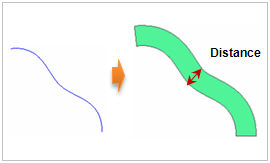
Select the edge and line to offset on the workplane.
Circles or arcs can also be selected. Because
the offset is always in the normal direction of
the target edge, there is no need to set the direction.
The user only needs to input the distance to automatically
offset. Checking the [Make Face] option creates
a plane that contains the offset edges.
Geometry set
Register the generated edges on the Geometry
set. The user can specify the name of the Geometry
set. |


 Create a new
line by offsetting an existing edge by a certain distance.
The offset is created only when the edges exist on the
workplane.
Create a new
line by offsetting an existing edge by a certain distance.
The offset is created only when the edges exist on the
workplane.
